Spreadsheets

2255Get the Last Monday of the Month in Google Sheets - Formula

How to Use the Google Sheets EOMONTH Formula

If you’re creating a timetable for students in Google Sheets, or just planning ahead, you may need to know when is the last Monday of the month (or any other last weekday day of the month). To calculate this, you can simply use the Google Sheets EOMONTHย  function In this tutorial, I will show you […]

1945Calculate Age in Google Sheets - Dataset

Calculate Age in Google Sheets (using the Date of Birth)

Google Sheets has some great date related formulas that can come in handy in many situations. In this tutorial, I will show you how to calculate age in Google Sheets using date of birth. This can easily be done using the DATEDIF function in Google Sheets. Calculate Age in Google Sheets The way Google Sheets […]

2209 Create Hyperlinks in Google Sheets - insert link url

Easily Make a Google Sheets Hyperlink (3 Simple Ways)

Let’s discuss how to make a Google Sheets hyperlink. You might want to do this to help viewers quickly find more information about a topic, access a relevant file, or to cite your data sources. This article gives step-by-step instructions on Google Sheets hyperlinks. Before we dive in, let’s discuss one more common usage. You […]

2074Filter Function in Google Sheets - using Cell References

5 Simple Examples for FILTER Function Google Sheets Mastery

https://www.youtube.com/watch?v=-z587aoPhCc Google Sheets has some useful functions that are not available in Excel (such asย IMPORTRANGE,ย QUERY,ย IMPORTDATA, etc.) One such extremely powerful one is the FILTER function. Using theย FILTER functionย in Google Sheetsย allows to instantly filter the source data to find specific information. What makes it so powerful is that it doesn’t need us to use any complex […]

1781Search in Google Sheets and Highlight the Matching Data - Demo

How to Search in Google Sheets and Highlight Matching Data

Watch Video – How to Search in Google Sheets and Highlight Matching Data If you work with huge datasets in Google Sheets, sometimes, it may get difficult to identify some data points. For example, if you have a list of students and their marks, it can take some time to find a student name and […]

2039Testing Multiple Conditions in OR Functions in Google Sheets

OR Function Google Sheets Tutorial with Examples for 2026

OR function is useful when you want to evaluate a set of conditions. It will return TRUE when any of the conditions being checked are met, else it returns FALSE. Let’s dive into our OR function Google Sheets guide. OR Function Google Sheets Syntax OR in Google Sheets works with the following syntax: OR(logical_expression1,ย [logical_expression2, …]) […]

1999Result of the IMPORT Range function in Google Sheets

An Easy & Comprehensive IMPORTRANGE Google Sheets Guide (2026)

Importing data from other documents into your current file doesnโ€™t have to be hard. Iโ€™ll use this IMPORTRANGE Google Sheets function guide to show you how to do it in just a few minutes. This blog post will discuss the process in further detail below. But, essentially, IMPORTANGE in Google Sheets can be boiled down […]

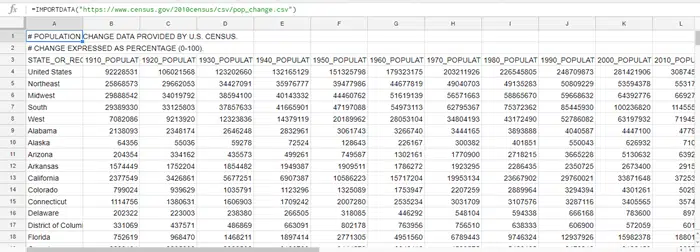
1832 Result of IMPORTDATA function in Google Sheets

How to Use IMPORTDATA function in Google Sheets

Watch Video – IMPORTDATA Function in Google Sheets IMPORTDATA function is Google sheets allows you to quickly import the data from the URL of a .csv (comma separated value) or .tsv (tab-separated value) file. This can be useful if you’re working with data that is available online in a .csv/.tsv file. Using IMPORTDATA function, you […]

1949 Using absolute references in the Google Sheets IFS function

Learn IFS in Google Sheets in 5 Minutes (2 Easy Examples)

The IFS Google Sheets function lets you easily test multiple conditions in a single formula. While the functions can get long and seem daunting, once you understand them,y ouโ€™ll be applying them fluently. This guide aims to teach you everything you need to know about IFS statements in Google Sheets to get started quickly. Read […]

969 A user is leading how to freeze a row in Google Sheets

How To Freeze a Row in Google Sheets [Easy 5-Minute Guide]

Do you want to learn how to freeze a row in Google Sheets? Youโ€™ve come to the right place! In this detailed guide, Iโ€™ll discuss how to freeze and unfreeze rows or columns in Google Sheets with my step-by-step instructions and screenshots. While there are several methods of freezing rows, the quickest and easiest way […]

1919 DIV error in Google Sheets

The IFERROR Google Sheets Function (Easy 2026 Guide)

If you work with formulas in Google Sheets, you know that errors can pop up any time. While getting errors is a part of working with formulas in Google Sheets, it’s important to know how to handle them correctly. In this tutorial, I will show you how to use the IFERROR Google Sheets function to […]

488google sheets functions and formulae

How to Add Drop Down List in Google Sheets in 2 Minutes

A drop-down list in Google Sheets can be helpful when you want the user to select from pre-defined options. It’s a great way to make the data entry consistent. Watch Video – How to Add Google Sheets Drop-Down List For example, a user from a drop-down list can select easily the country as the US. […]

Access All

Free Templates

Enjoy our custom-made Google Sheets templates for free via email access